Keeping accurate business mileage records is an important part of managing work-related driving. Whether you are a freelancer, sales professional, field worker, or small business owner, regularly tracking your business trips can become difficult when you rely on paper notes or spreadsheets.
A Car Mileage Tracker App can simplify this process by using GPS technology to record trips, calculate distances, and organize mileage information in one place. Instead of trying to remember every journey at the end of the week or month, drivers can maintain more consistent records with less manual effort.
In this guide, we’ll explain how mileage tracking apps work, their key benefits, and how they can make business mileage records easier to manage.
What Is a Car Mileage Tracker App?
A Car Mileage Tracker App is a mobile application designed to record and organize the miles driven for business purposes. Depending on the app, it may use GPS and other smartphone features to automatically detect and record trips.
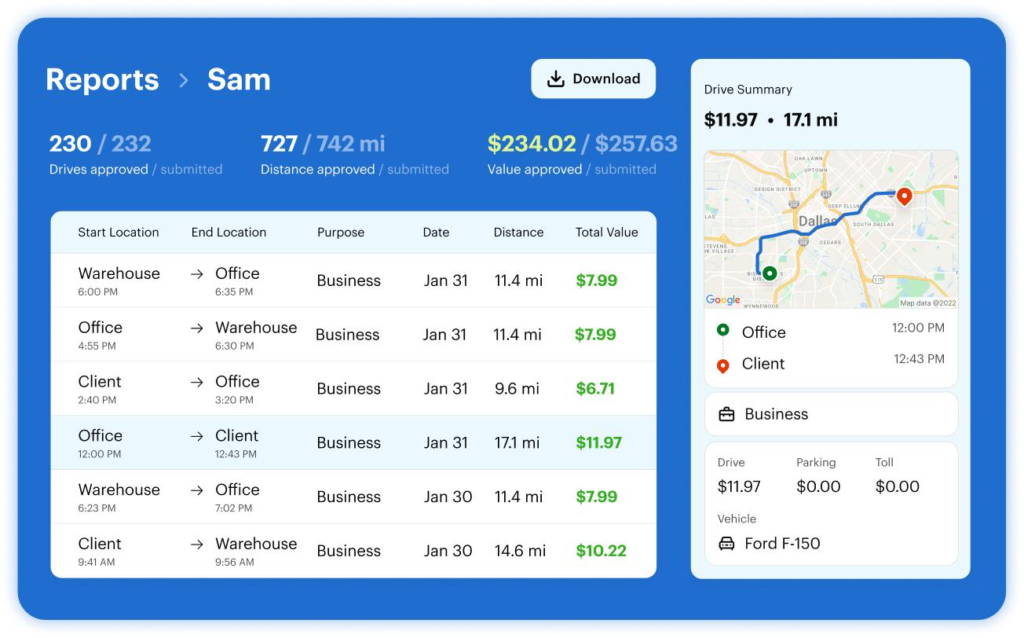
A typical mileage tracking solution can help you record information such as:
- Date of the trip
- Starting and ending locations
- Distance traveled
- Business or personal trip classification
- Purpose of the journey
- Mileage totals
- Related vehicle expenses
Instead of maintaining a handwritten mileage log, users can keep their driving records digitally and review them whenever necessary.
Why Is Business Mileage Tracking Important?
Business mileage records can be useful for accounting, reimbursement, budgeting, and tax-related recordkeeping. If you use your personal vehicle for work, maintaining a clear record of business-related journeys can help you understand how much you drive for professional purposes.
Accurate records may also make it easier to prepare documentation for applicable mileage deductions or reimbursements. However, tax rules differ by location and can change over time, so you should always verify the current requirements that apply to your situation or consult a qualified tax professional.
Good mileage records should generally provide enough information to explain when, where, and why a business trip occurred.
How Does a Mileage Tracking App Work?
Most mileage tracking apps are designed to reduce the amount of manual work involved in recording trips.
Once the necessary permissions are enabled, GPS technology can help identify driving activity and calculate the distance traveled. Depending on the application, users may then classify the trip as business or personal and add additional information.
The general process looks like this:
- Enable mileage tracking on your smartphone.
- Start a business trip.
- Allow the app to record the journey using GPS.
- Review the recorded distance and route.
- Mark the trip as business or personal.
- Add a business purpose or notes when required.
- Review and organize your mileage records regularly.
This process can be much simpler than manually writing down every trip.
7 Ways a Car Mileage Tracker App Simplifies Business Records
1. Reduces Manual Data Entry
One of the biggest advantages of digital mileage tracking is reduced manual recordkeeping. Instead of recording every journey in a notebook or spreadsheet, GPS-based tracking can capture much of the basic trip information automatically.
This can be particularly useful for professionals who make several business trips each day.
2. Helps Separate Business and Personal Trips
Many people use the same vehicle for both work and personal activities. Mixing these trips together can make mileage records difficult to manage.
A digital tracker can help users categorize journeys as business or personal. Reviewing these classifications regularly can make it easier to maintain organized records.
3. Creates More Consistent Mileage Logs
Human memory is not always reliable. A trip that seems easy to remember today can become difficult to recall several weeks later.
Automatically recording trips can help create a more consistent mileage history. Users can review their records throughout the year instead of attempting to reconstruct months of driving at once.
4. Makes Mileage Calculations Easier
Calculating distances manually can take time and may lead to mistakes. GPS-based tracking can automatically calculate the distance associated with recorded journeys.
This gives users a convenient way to monitor total business mileage and understand their driving patterns.
5. Keeps Important Information Organized
A paper log may contain mileage information, but organizing months of handwritten records can be challenging. Digital records can make it easier to search, review, categorize, and summarize trips.
For business owners and independent professionals, having organized information can simplify routine bookkeeping and financial administration.
6. Supports Expense Tracking
Business driving can involve more than fuel. Depending on your circumstances, you may also have expenses related to parking, tolls, maintenance, or other vehicle costs.
Some mileage tracking solutions allow users to record expenses alongside mileage information. Keeping these details organized can provide a clearer picture of the overall cost of business travel.
7. Simplifies Report Preparation
When business mileage records are organized throughout the year, preparing a summary can be easier. Digital mileage trackers may allow users to generate or export reports containing relevant trip information.
These reports can be useful for reviewing business travel, sharing information with an accountant, or maintaining records for applicable tax and reimbursement purposes.
What Features Should You Look For?
Not every mileage tracking solution works in exactly the same way. Before choosing one, consider the features that match your business needs.
Automatic GPS Tracking
Automatic tracking can save time by recording trips without requiring you to manually enter every distance.
Trip Classification
Look for an easy way to distinguish business journeys from personal driving.
Mileage Reports
Detailed reports can help you review mileage by date, trip, distance, or category.
Expense Management
If you also need to monitor vehicle-related expenses, consider a solution that supports expense records.
Data Export
Export options can be useful when you need to share mileage information with accounting software, a tax professional, or your business records.
Privacy and Data Controls
Because mileage tracking can involve location information, review the application’s privacy policy and permissions before enabling automatic tracking.
Tips for Maintaining Accurate Business Mileage Records
Using a tracking app does not completely eliminate the need for reviewing your records. You should regularly check that trips have been recorded correctly and that business and personal journeys are properly classified.
Here are a few useful practices:
- Review mileage records at least once a week.
- Add the business purpose of important trips.
- Correct incorrectly recorded journeys promptly.
- Keep supporting documents for relevant business expenses.
- Check that GPS tracking is working properly.
- Maintain records according to applicable tax or reimbursement requirements.
- Back up or export important records when appropriate.
Regular reviews can help prevent small errors from becoming larger problems later.
Car Mileage Tracker App vs. Manual Mileage Logs
Traditional mileage logs can work, but they require consistent manual effort. You need to remember each trip, record the distance, and maintain the information over time.
A Car Mileage Tracker App can automate much of this process. GPS technology can record trips while digital tools can help categorize, organize, and summarize the information.
However, manual logs may still be useful as a backup or for situations where automatic tracking is unavailable. The best method depends on your driving habits, recordkeeping requirements, and business workflow.
Who Can Benefit From a Mileage Tracking App?
Mileage tracking can be particularly helpful for people who frequently drive for work, including:
- Freelancers and independent contractors
- Sales representatives
- Real estate professionals
- Delivery and service workers
- Consultants
- Field technicians
- Small business owners
- Employees who regularly travel for business
If business driving is a regular part of your work, digital mileage tracking can reduce administrative tasks and help you maintain better records.
See also: How F&B License Singapore Requirements Have Evolved for Modern Food Businesses
Final Thoughts
Business mileage tracking does not have to involve complicated spreadsheets or piles of paperwork. A Car Mileage Tracker App can simplify the process by automatically recording trips, calculating distances, separating business and personal journeys, and organizing important mileage information.
The key is to use the technology consistently and review your records regularly. Accurate mileage tracking can make business administration easier while giving you a clearer picture of your work-related driving.
Before selecting a mileage tracking solution, consider its tracking method, reporting capabilities, privacy controls, expense features, and compatibility with your existing workflow. With the right approach, digital mileage tracking can turn a time-consuming recordkeeping task into a much simpler part of your daily business routine.