A POS system looks trivial from the customer’s side of the counter: tap, beep, receipt. Behind the counter it is one of the harder things to build, because software, physical hardware, and live payments all have to work together in real time, with a customer waiting. As the FinTech Engineering Lead at Acquaint Softtech, a software product development partner, I build POS systems where the card reader, the inventory, and the payment processor stay perfectly in step.
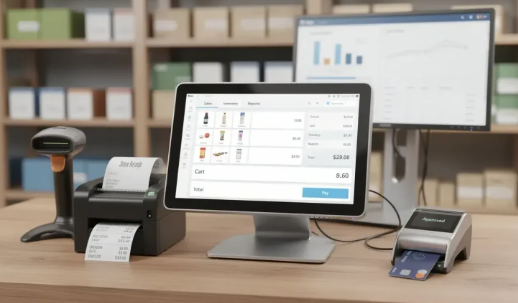
A POS system is hardware plus software. The hardware captures the sale, a terminal, card reader, printer, and scanner, while the software runs checkout, inventory, payments, and reporting. The two hardest decisions are how the devices integrate and how card data flows, because those choices set both your reliability and your compliance burden.
The technical details here follow common payment and retail-hardware practice. This guide draws on hardware-and-software platforms Acquaint Softtech has built as an Official Laravel Partner, with 1,300+ projects, 70+ in-house engineers, and clients across the USA, UK, Europe, and Australia who deploy dedicated teams within 48 hours of a brief.
| Quick answer: what is a POS system?A POS (point of sale) system is the combined hardware and software a business uses to complete a sale: taking payment, updating inventory, and recording the transaction. The hardware includes a terminal, card reader, and often a receipt printer and scanner, while the software handles sales, inventory, payments, and reporting. |
What a POS system is
A POS system is the point where a sale is completed, built from hardware and software that must work as one. Modern systems are usually cloud-based software running on a tablet or terminal, wired to a set of connected devices, and used across retail, hospitality, healthcare, and services.
What makes POS distinctive as a build is that it lives in the physical world. Unlike a pure web app, it has to talk to card readers and printers, keep working when the internet drops, and never make a paying customer wait, which raises the bar on both reliability and integration.
The hardware components
The hardware is the set of physical devices that capture a sale, and each connects to the software over USB, Bluetooth, or the network. A build has to account for every one of them, including how they fail.
- Terminal or tablet: the computer that runs the POS software and ties the devices together.
- Card reader: accepts chip, contactless, and swipe payments, and is the most security-sensitive device.
- Receipt printer and scanner: print receipts and read barcodes to add items quickly.
- Cash drawer and customer display: hold cash and show the customer what they are paying.
The software modules
The software is where the sale is actually managed, and a complete POS is several modules working together, not just a checkout screen. Getting these to share one clean data model is what separates a solid system from a fragile one.
- Sales and checkout: ringing up items, applying discounts, and taking payment.
- Inventory management: tracking stock in real time and syncing it across locations and online.
- Payments and reporting: processing transactions and giving owners live sales and margin data.
- Customers and staff: loyalty, receipts by email, and per-employee permissions and shifts.
How hardware integrates: SDKs, drivers, and standards
Devices connect to POS software through drivers and SDKs, and getting that layer right is most of the engineering effort in a POS build. Older systems used standards like OPOS and JavaPOS to talk to peripherals; modern ones use each vendor’s own SDK over USB or Bluetooth.
Payment terminals are the special case, integrated through a payment processor’s own SDK, such as Stripe Terminal, rather than a generic driver. This is API-heavy work where teams that hire API developers with device experience handle the reconnection, error, and timeout cases that decide whether the lane keeps moving when a reader drops its connection.
Integrated vs semi-integrated payments
This is the single most important architectural choice in a POS build, because it decides your compliance burden. In an integrated setup, card data flows through your POS software; in a semi-integrated setup, the payment terminal handles the card directly and your software never touches the raw card data.
| Aspect | Integrated | Semi-integrated |
| Card data path | Through your POS software | Only through the terminal |
| PCI scope | Large and costly | Sharply reduced |
| EMV certification | Your responsibility | Already done by the processor |
| Best for | Rare, special cases | Almost every POS build |
Choose semi-integrated in almost every case. Because raw card data never enters your application, your PCI scope drops dramatically and the terminal arrives pre-certified for EMV, saving both a security burden and months of certification work.
Cloud vs on-premise, and offline mode
Cloud POS keeps data central so an owner sees every location live and updates ship automatically, while on-premise software runs locally but is harder to maintain and scale. Most modern systems are cloud-based for exactly those advantages.
The catch is connectivity, and the answer is offline mode. A well-built POS keeps ringing up sales when the internet drops by storing transactions locally, then syncing them the moment the connection returns, so a network blip never stops the register or loses a sale.
Mobile POS and Tap to Pay
Mobile POS (mPOS) turns a phone or tablet into a full POS terminal, letting a business take payment anywhere instead of only at a fixed counter. Newer still is Tap to Pay, or SoftPOS, which accepts contactless cards and wallets directly on a phone with no separate card reader at all.
This shift is large and fast: the mobile POS market is growing at roughly 20% a year and is projected to pass 100 billion dollars by 2030. Building an mPOS that is fast, reliable, and secure on the device is a mobile app development discipline in its own right, where the app must manage payments, peripherals, and offline behavior on hardware you do not control.
Short answers to common questions
What are the main parts of a POS system?
A: Hardware and software. The hardware is the terminal or tablet, card reader, receipt printer, barcode scanner, and cash drawer. The software runs checkout, inventory, payment processing, and reporting, all sharing one data model.
What is the difference between integrated and semi-integrated payments?
A: In an integrated setup, card data flows through your POS software. In a semi-integrated setup, the payment terminal handles the card directly, so raw card data never touches your app. Semi-integrated sharply reduces your PCI scope and is the usual choice.
How does POS hardware connect to the software?
A: Through drivers and SDKs over USB, Bluetooth, or the network. Peripherals like printers may use standards such as OPOS or JavaPOS, while payment terminals integrate through a payment processor’s own SDK rather than a generic driver.
Does a POS system work without internet?
A: A well-built one does. Offline mode stores sales locally when connectivity drops and syncs them once the connection returns, so the register keeps working and no sale is lost during a network outage.
What is mobile POS and Tap to Pay?
A: Mobile POS turns a phone or tablet into a POS terminal. Tap to Pay, or SoftPOS, goes further and accepts contactless cards and wallets directly on a phone with no separate card reader, lowering hardware cost for small merchants.
How do I reduce PCI scope when building a POS?
A: Use semi-integrated payments so raw card data never enters your POS software, keep the card reader as the only device that touches card data, and rely on the processor’s pre-certified terminal. This is the biggest single lever on compliance cost.